

Context
What is the European Accessibility Act?
The european accessibility act is Directive (EU) 2019/882 of 17 April 2019. Each Member State transposes it into national law, and its requirements apply from 28 June 2025.
It requires certain products and services offered to consumers to be usable by people with disabilities too. The services include e-commerce, consumer banking, passenger transport and electronic communications.
For websites and apps, Annex I asks for them to be perceivable, operable, understandable and robust: the same four principles as the W3C’s WCAG guidelines.
Scope
Who does the European Accessibility Act apply to?
This is the full table the agent uses to decide whether the Directive applies. Each row cites its legal basis in Directive 2019/882.
| Criterion | SME or large company | Microenterprise | Legal basis |
|---|---|---|---|
| Online shop or selling online to consumers | It applies | Exempt | Directive 2019/882, Art. 2(2)(f) · Directive 2019/882, Art. 3(30) |
| Banking or financial services for consumers | It applies | Exempt | Directive 2019/882, Art. 2(2)(d) |
| Passenger transport: air, bus, rail or ship | It applies | Exempt | Directive 2019/882, Art. 2(2)(c) |
| Urban, suburban or regional transport | Only in part | Exempt | Directive 2019/882, Art. 2(2)(c) |
| Telephone, internet or messaging services | It applies | Exempt | Directive 2019/882, Art. 2(2)(a) |
| Platform giving access to audiovisual media | It applies | Exempt | Directive 2019/882, Art. 2(2)(b) |
| E-books and their reading apps | It applies | Exempt | Directive 2019/882, Art. 2(2)(e) |
| Electricity, water or gas supply | Per country | Per country | Directive 2019/882, Art. 2(2) |
| Travel agency or tour operator | Per country | Per country | Directive 2019/882, Art. 2(2) |
| Social network | Per country | Per country | Directive 2019/882, Art. 2(2) |
| Information or professional services website, no online contracting | Out of scope | Out of scope | Directive 2019/882, Art. 2(2) · Directive 2019/882, Art. 3(30) |
| I only sell to businesses (B2B) | Out of scope | Out of scope | Directive 2019/882, Art. 2(2) · Directive 2019/882, Art. 3(22) |
| Public administration or public sector | Another law | Another law | Directive (EU) 2016/2102 |
A microenterprise, for the Directive, employs fewer than 10 persons and has an annual turnover or balance sheet total of no more than EUR 2 million. Those providing services are exempt (Art. 4(5)).
Obligations
What EAA compliance requires if it applies
If the Directive applies, these are the obligations the agent’s table assigns. Each links to the EUR-Lex passage that sets it.
| Criterion | Legal basis | From |
|---|---|---|
| Meet the general accessibility requirements for services | Directive 2019/882, Art. 4(3) · Directive 2019/882, Annex I, Section III | 28 Jun 2025 |
| Website and app perceivable, operable, understandable and robust | Directive 2019/882, Annex I, Section III | 28 Jun 2025 |
| Requirements specific to your type of service | Directive 2019/882, Annex I, Section IV | 28 Jun 2025 |
| Explain publicly how your service meets the requirements | Directive 2019/882, Art. 13(2) | 28 Jun 2025 |
| Have procedures to stay compliant as things change | Directive 2019/882, Art. 13(3) | 28 Jun 2025 |
| Fix non-conformities and inform the authority | Directive 2019/882, Art. 13(4) | 28 Jun 2025 |
| Content the law leaves out | Directive 2019/882, Art. 2(4) | 28 Jun 2025 |
| Disproportionate burden exception: only justified and assessed | Directive 2019/882, Art. 14(1) | 28 Jun 2025 |
| Transition periods for earlier contracts and equipment | Directive 2019/882, Art. 32(1) | 28 Jun 2030 |
| Penalties for non-compliance | Directive 2019/882, Art. 30(1) | 28 Jun 2025 |
Your website is only part of eaa compliance. The Directive also asks you to publish information and keep procedures, even if your website does not change.
Technical
What to check on your website: WCAG 2.2 criteria
european accessibility act testing usually starts with criteria like these. The agent shows the ones that match what your website has; here is the full list.
| Criterion | Level | What to check |
|---|---|---|
| 1.1.1 Non-text contentEvery website | A | Every informative image has alternative text that says the same; decorative ones, empty alt. |
| 1.3.1 Info and relationshipsEvery website | A | Headings, lists and tables marked up as such, not just styled. |
| 1.4.3 Contrast (minimum)Every website | AA | Text contrast of at least 4.5:1 (3:1 for large text). |
| 1.4.4 Resize textEvery website | AA | Can be zoomed to 200% without losing content or functions. |
| 2.1.1 KeyboardEvery website | A | Everything works with the keyboard alone: menus, buttons, dropdowns. |
| 2.4.4 Link purpose (in context)Every website | A | Each link says where it goes; no bare “click here”. |
| 2.4.7 Focus visibleEvery website | AA | When using the keyboard you can see where you are. |
| 3.1.1 Language of pageEvery website | A | The page declares its language (lang attribute). |
| 3.3.2 Labels or instructionsForms | A | Every field has a visible, associated label, not just a placeholder. |
| 3.3.1 Error identificationForms | A | Errors are described in text, not only with colour. |
| 1.3.5 Identify input purposeForms | AA | Personal data fields use autocomplete (name, email, phone). |
| 3.3.8 Accessible authentication (minimum)Sign-up, login or payment | AA | Logging in needs no puzzles or memorising; passwords can be pasted. |
| 3.3.4 Error prevention (legal, financial, data)Sign-up, login or payment | AA | Before paying, the order can be reviewed, corrected or cancelled. |
| 2.2.1 Timing adjustableSign-up, login or payment | A | If the session times out, users are warned and can extend it. |
| 1.2.2 Captions (prerecorded)Video or audio | A | Videos with audio have captions. |
| 1.2.5 Audio description (prerecorded)Video or audio | AA | What is only shown in the video is also described in audio. |
| 2.2.2 Pause, stop, hideVideo or audio | A | Anything moving on its own for over 5 seconds can be paused. |
| 2.4.2 Page titledPDFs or documents | A | Every document has a title that describes it. |
| 1.3.1 Tagged PDFsPDFs or documents | A | PDFs are tagged (headings, lists, tables, reading order), not scanned images. |
| 1.3.4 OrientationMobile app | AA | The app works in portrait and landscape. |
| 2.5.8 Target size (minimum)Mobile app | AA | Buttons at least 24 × 24 pixels or well spaced. |
| 2.5.1 Pointer gesturesMobile app | A | Anything needing a pinch or swipe also works with a single tap. |
It is a selection of criteria that often fail, not a full audit. WCAG 2.2 has many more, and even the best automated tool only detects part of them.
For a report you can show a client or an authority, you need a manual review with assistive technology by a specialist.
Timeline
European Accessibility Act key dates
The two dates that matter for a service, per Articles 31 and 32 of the Directive.
Requirements apply
From this date, the listed services must meet the accessibility requirements.
End of the transitional period
Until then, providers may keep using products they were lawfully using to provide the service.
Service contracts agreed before 28 June 2025 may continue unaltered until they expire, but for no longer than five years from that date.
Risk
European Accessibility Act fines
The Directive does not set fines itself. Each Member State lays down the penalties in its national law; they must be effective, proportionate and dissuasive, with remedial action in case of non-compliance.
So the amount depends on the country where you provide the service. In Spain, for example, the subsidiary regime goes from EUR 301 to EUR 1,000,000.
Architecture
How does IA Accesible work?
Like BOE AI and IA RIA: code decides what code can decide, and the models only explain and check.
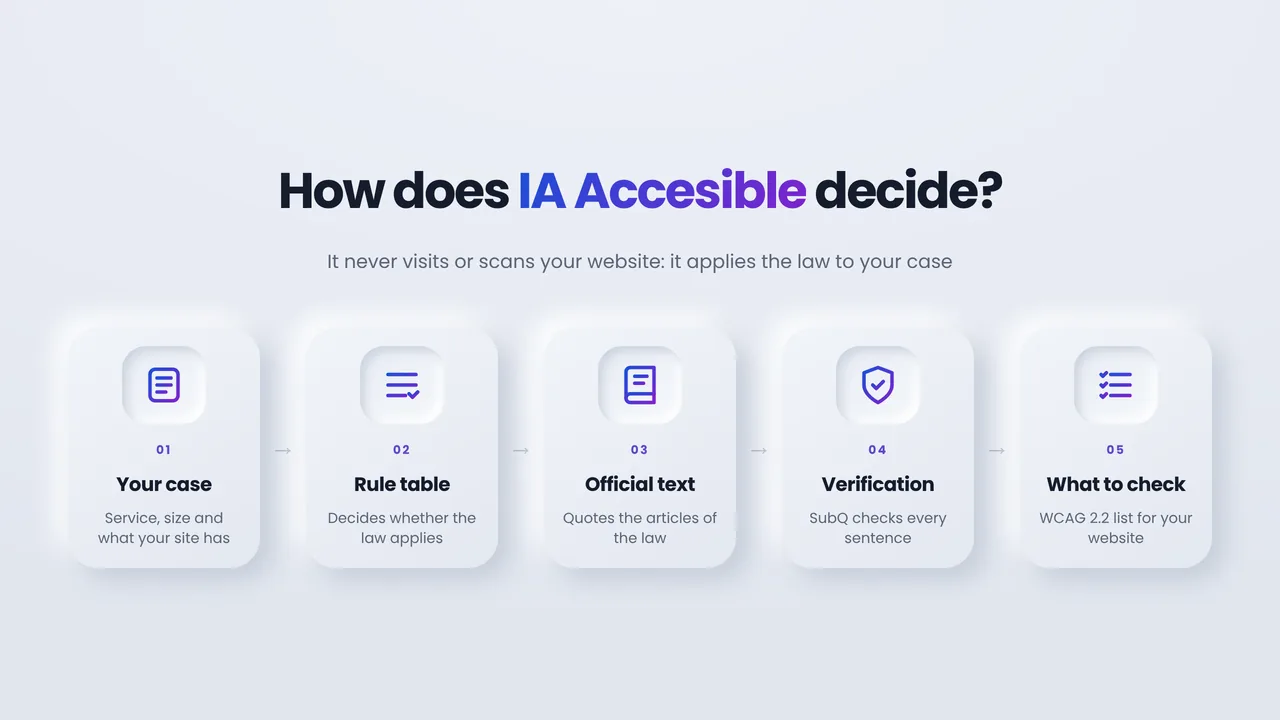
Rule table
From your service and size, it decides whether the Directive applies, your obligations and their date. From what your website has, it picks the WCAG criteria. No AI.
Official text
It fetches the exact passages of Directive 2019/882 those obligations cite, as published in EUR-Lex.
Mistral explains
It explains each obligation for your case, only from those passages, without changing the result or the dates.
SubQ checks
It reviews every sentence: if it adds something, overstates or gives legal advice, a larger model rewrites it.
You decide
Each obligation links to its article so you can confirm it with a specialist.
The agent never visits your website. It needs no URL and no data about you: only the options you pick.
The same selection always gives the same result, so answers are cached for a week: if someone already ran your combination, you get it instantly and at no cost.
Reliability
Verification: three questions to SubQ on every answer
SubQ is a decision model that returns probabilities. Every sentence of the explanation goes through one of these questions:
Does it add anything?
What each obligation “requires” is checked against its passages: requirements, dates, figures or exceptions that are not there count as a failure.
Does it overstate the duty?
The “why it matters” is checked so it does not turn an option into a duty, widen who is affected or drop exceptions.
Does it give legal advice?
The conclusion cannot tell you with certainty what you must do: it explains the rules and suggests confirming with a lawyer or an accessibility specialist.
If it fails, another round
If any failure probability is above 70 %, a larger model (Mistral Medium) rewrites it and SubQ checks again. If it still fails, it is flagged.
Privacy
Security and data
The same defences as BOE AI and IA RIA, reviewed against the OWASP Top 10 for LLM applications.
You type nothing
You only pick closed options. Neither your URL nor any text of yours reaches a model, so there is no personal data to leak and no instruction to inject.
Its own keys
IA Accesible uses its own SubQ and Mistral keys, separate from the other agents, so its spend and usage are measured apart.
Against abuse
The agent’s own ALTCHA proof of work, per-visitor and global limits, a daily cap on new queries and a one-week cache.
No tracking
Your IP is only used in memory for the limits and is never stored. Usage leaves an anonymous log of the options picked and the cost.
Honesty
Status and limits
What the agent does today and what it cannot do, plainly.
Works today
- Applies a table of 13 service types and 3 sizes to the text of Directive 2019/882.
- Quotes and links every passage in EUR-Lex, and every WCAG criterion in the W3C documentation.
- Checks every sentence of the explanation with SubQ and rewrites it if it fails.
Limits
- It does not scan your website and does not replace an audit.
- It covers services only. The Directive also covers products, such as computers, payment terminals or ATMs, which the agent does not.
- It follows the Directive, not each country’s national law, which may add services or set different details.
- If the law changes, the table and the text must be updated by hand.
Harmonised standards and national rules may specify how each requirement is met. The agent quotes the Directive, not those.
What is behind it
- Rule table: From your service and size, it decides whether the Directive applies, your obligations and their date. From what your website has, it picks the WCAG criteria. No AI.
- Official text: It fetches the exact passages of Directive 2019/882 those obligations cite, as published in EUR-Lex.
- Mistral explains: It explains each obligation for your case, only from those passages, without changing the result or the dates.
- SubQ checks: It reviews every sentence: if it adds something, overstates or gives legal advice, a larger model rewrites it.
- You decide: Each obligation links to its article so you can confirm it with a specialist.
FAQ
Frequently asked questions
What is the European Accessibility Act?
It is Directive (EU) 2019/882. It requires certain products and services for consumers to be accessible to people with disabilities. Its requirements apply from 28 June 2025, through each Member State’s national law.
Does the EAA apply to my online shop?
E-commerce services for consumers are in scope. If you are an SME or a large company, it applies; microenterprises providing services are exempt from the requirements. Confirm your case with a specialist.
What is a microenterprise under the EAA?
An enterprise that employs fewer than 10 persons and has an annual turnover not exceeding EUR 2 million or an annual balance sheet total not exceeding EUR 2 million (Art. 3(23)).
What are the European Accessibility Act requirements for websites?
Annex I asks for websites and mobile apps to be perceivable, operable, understandable and robust, plus service-specific requirements, such as accessible identification and payment in e-commerce.
What are the European Accessibility Act fines?
Each Member State sets them in its national law. They must be effective, proportionate and dissuasive, so amounts differ by country.
Does this agent test my website?
No. It never visits or scans your website. It tells you whether the Directive applies and which WCAG 2.2 criteria to check, given what your website has, so you can test or commission a test.
Can I rely on the answer?
The result and dates come from a fixed table and every sentence is checked against the official text, but it is guidance only: it does not replace a lawyer or a professional audit.
Custom AI agents
Want an agent like this for your regulations?
I design agents that apply rules to specific cases with reviewable logic, official text and verification, for law firms, advisory firms and compliance teams.
Source of the legal text
Directive (EU) 2019/882 as published in EUR-Lex. © European Union, reuse authorised (Decision 2011/833/EU); the agent’s summaries are not official.
Directive 2019/882 in EUR-LexThis article was created with the help of AI and reviewed by José Galán. I take great care over every post and every translation, but the odd mistake can still slip through. If you find one, write to me: you will be helping me improve.